Showing posts with label ITM. Show all posts

Sunday, January 16, 2011

Direct upgrade from OMEGAMON Platform 350/360 to the current IBM Tivoli Monitoring release is not supported

Recently I encountered this error while installing support files on the TEPS together with a colleague.

At first we thought that perhaps it was a problem with the files we had downloaded, but trying to reinstall something that had just succeeded failed with the same message.

The cause of the problem seems to be a corruption in the file
C:\IBM\ITM\INSTALLITM\ver\KINWIINSMSTR.ver

Replacing it with the .bck file (which resided in the same directory) solved the problem.

Well, I haven’t posted in quite a while… but I’m back!
-- Robert

Thursday, April 22, 2010

ITM Situation limits

ITM situations are constructed out of a number of very flexible conditions and the mechanism is very powerful. It’s probably about as flexible that one can get without using regular expressions (spit!)

However, it does have a big problem - a very frustrating limit to the number/size of the conditions.

ITM Situation Limits

-- Robert

Monday, March 22, 2010

Unable to start request (350) with ITM SOAP

There are a number of ways of accessing the information in ITM.
The simplest is, of course, opening the portal.

Another way is to use the SOAP web services supplied by ITM.
One access the simple SOAP interface from http://localhost:1920///cms/soap/kshhsoap.htm

Two gotchas I recently encountered:
1. In some cases, I needed to enter the full fqdn of the TEMS server (server_name.domain_name).

2. The commands need to be all in UPPERCASE:
<CT_Get>
<userid>sysadmin</userid>
<password>password</password>
<table>O4SRV.UTCTIME</table>
<sql>SELECT GBLTMSTMP, SITNAME, DELTASTAT, NODE, ORIGINNODE FROM O4SRV.ISITSTSH</sql>
</CT_Get>

Otherwise, I get the dreaded <faultstring>Unable to start request(350)</faultstring> response…

Friday, January 29, 2010

Some minor Tivoli issues I’ve dealt with lately

As part of getting back on the saddle with my blog, I’m going to list a few of the problems I’ve encountered lately and, more importantly, how I solved them.

ITM 6.2.1 on Windows

I had a case where a universal agent simply would not start. Looking at the logs showed nothing wrong, it was just not registering with the TEMS. The Perl script was unchanged, the owner of the script had not touched it.

I googled “script Universal Agent restart” and one of the first hits I got was for an APAR (patch) called IY86181: UA RESTART MAY FAIL IF A SCRIPT LAUNCHED WITHIN UA IS RUNNING. Interesting.
Unfortunately, this patch is for Unix servers and came out back in 2006! It did get me thinking and I checked the Task Manager for running processes. There were lots and lots and lots of Perl.exe…. hmm. I killed all the Perl.exes and lo and behold – the UA connected to the TEMS!

Pity it still didn’t show any data :(

I then opened up a command window and ran the script. Wouldn’t you know? The script hung because it asked me to press ‘y’ or ‘n’ for some security setup.

Pressing ‘y’ a few times solved the problem and the Universal Agent ran properly from then on. Oh, and the script owner remembered that he had added a few more servers to the config file.

Lessons learned?

  1. NEVER believe whatever the client tells you. ESPECIALLY if they say “nothing changed, but now it doesn’t work”.
  2. If something external to the application stops working, first test it by itself.
  3. When researching a problem, look at similar-but-not-identical-problems and see if their solution can be fitted to suit you too.
  4. Not every problem will show up as an error in the log. In this case, the UA was functioning properly, it was simply waiting forever for someone to press ‘y’!
  5. Practice your skills. I haven’t been working on bugs in production environments lately, I’ve been busier installing new systems.
    This list of suggestions is written in the fastest way to solve the problem, but the exact opposite of the order I did them in!

6.2.2 on Redhat Linux

I was trying to configure the Warehouse Proxy on a new installation, but when I right-clicked configure then the Messages window shows 'Starting configuration ...' but the configuration screen never displayed.

I found a PMR which had my exact case and it even had the solution!
Removing the file $CANDLEHOME/<arch>/bin/ksz.jar and restarting the management console enabled me to configure the Proxy agent.

Lessons learned?

  1. One of the advantages of working for IBM (or having IBM support) is, of course, the common databank of lots and lots of people working on the same systems.
    It would have taken me ages to solved the problem on my own, or a week or so if I’d opened a PMR. Having had someone else, on the other side of the world perhaps, do that once – enabled me to solve my problem in about an hour and a half  (one hour to play around with the system, half an hour to search the PMR databank, find the solution and implement it)

-- Edit 01-Feb-2010
Of course, NOW I find a technote which presents the solution: http://www-01.ibm.com/support/docview.wss?uid=swg21409333. In my defense, I encountered the problem prior to the technote being published. I’ve been told that this bug will be fixed in an upcoming fix pack.

Sunday, May 24, 2009

Case-sensitive background images

Not every problem is a nail-biting, headache-inducing, going-to-loose-sleep-over-it mammoth. Some problem are just minor head scratchers...

Within ITM, you can create Graphical Views which will display the information in a visual fashion. I.e, you could have a floor map or draw a line of business or whatever, and add icons representing the various monitored objects. You could consider it BSM-lite or TBSM on the cheap.

One problem I just encountered was adding a background image. I did the various right-clicking necessary to bring up the list of images, but for some reason the one I wanted simply didn't show up!

Eventually, a bit of trial and error showed that the files was not showing up because it was called background.JPG instead of background.jpg. Can you see the difference?

Oh, Why can't computers overcome the minor errors and just do what we want?

-- Robert

Wednesday, May 6, 2009

A problem with the DBVER table in the TEPS database in ITM

I've encountered a few cases in which the TEPS service would not start. The error I found in the log was something like this:

KFW1005E The version of the product 'v620_kcj7310a.tms620' does not match the data in the KFWDBVER table.


Opening up the TEPS database and looking at the KFWDBVER table shows that it's just a list of upgrades from version to version of ITM.


Part of the TEPS startup routine is evidently checking that the latest version marked in the database matches the current version. 
I have no idea why or how an miss-match might creep in, but each time I've encountered an error like this was after a newbie was let loose on a test server and told to "play with it & try out upgrading"...


So, how do we solve this problem? I've solved it in three different ways, but take into account that these were all test servers, so I had nothing to loose.


  1. Editing the DBVER table with my DB tool of choice so that the latest version written matches what the log says ITM is looking for - This should return everything to normal.


  2. Opening the ITM manager, right click TEPS, right click Utilities, click Build TEPS database - This will reset the TEPS database and start you off will a fresh environment.


    Since the TEPS will immediately synchronize with the TEMS, all you'll loose are your personal configurations.


  3. Reinstalling TEPS - As I said, this is a bug I've only seen in test environments, so no harm in just reinstalling.


In short, this is an annoying problem with a short(though surgical) solution which brings you back to normal or a "hammer" solution. You've just got to choose which you prefer.


-- Robert

Thursday, April 30, 2009

I got a working system but tacmd login hangs...

I recently "inherited" a small ITM environment. It had been used as a Proof of Concept trial, passed with flying colours and now the client wanted to start using it. Obviously, the way to save time is to simply reuse the existing environment, because it already works.
And at first glance, it did. Everything seemed to function properly for the first day or two, till I wanted to export all the situations to a file before I did some heavier work.

That's when I discovered that the command tacmd login didn't work. It just hang there for a few minutes and exited with a KUIC00006E timeout error.

Eventually, I found the solution, which is also documented here*. The problem was that some change had been done to the network on the server which meant that just about everything worked.

So the lesson learned here is that when you come to an unknown environment, no matter how simple and small it appears - make sure everything works properly before signing off on it :)


-- Robert

* This actually happened a few months ago, but the publication of this note reminded me.

Wednesday, March 25, 2009

Troubleshooting guides for TBSM, ITM and TADDM

A few links that are useful, collected together:

ITM:

ITM 6.2.1

ITM 6.2 Fixpack 1

ITM 6.2

ITM 6.1 (Revised)

TADDM:

TADDM 7.1.2

TADDM 7.1

TBSM:

TBSM 4.2

TBSM 4.1.1

TBSM 4.1

-- Robert

Wednesday, February 18, 2009

Finding unassociated Situations

In ITM, after you have created a new situation, you must do two things to it:

  1. You must distribute it to one or more agents. This will determine where a situation runs. i.e you can limit it to specific servers or run it on all of them.
  2. Associate it with some node in a tree in the TEP Portal. This is so that when the situation activates (fires, become true) you will see it in the portal console.

The problem then starts when you want to be sure that all your situations have been distributed and associated properly. The first problem is simpler - you can use a SOAP call on the TEMS to fish out the list of situations and their distributions. The second problem is slightly more complex. The TEPS database hold the list of all situations and associations - but a list of unassociated situations - which are the ones which will not show up even if they become true.

Recently I was at a customer and needed to verify that all situations were indeed associated. I remember seeing something that showed this, but my searching skills betrayed me and I wrote this out quickly. If anyone does have a link- feel free to send it.

Being a quick-and-dirty job (and being rusty with my Perl), this script will only work on the environment it was written for - Windows/SQLServer, but it should be easy to convert
Also, I committed the crime of using system calls in Perl, instead of SOAP and SQL calls embedded in the code - so sue me :)

#!/user/local/bin/perl
# This script will list situations which exist but are not associated with any portal navigator item.
# It is limited to Windows systems running SQLServer, but can easily be modified for any OS/DB combination. :)
# Part 1 - list all situations from TEMS
# Part 2 - list all situation associations from TEPS
# Part 3 - Find which situations exist in part 1 but not part 2
#
# Robert Barron Feb-2009

my $sSitListFile = "SitList.txt";
my $sSitAssocFile = "SitAssocList.txt";
my $sTEMSHOST = "x.x.x.x";
my $sTEMSUser = "xxxxxx"
my $sTEMSPassword = "xxxxxx";
my $sTEPSHOST = "x.x.x.x";
my $sTEPSUser = "xxxxxx"
my $sTEPSPassword = "xxxxxx";

# Part 1
#  login to TEMS and pull out a list of situations

system ("tacmd login -s " . $sTEMSHOST . " -u " . $sTEMSUser . " -p " . $sTEMSPassword);
if (-e $sSitListFile) {
    unlink ($sSitListFile);
}

#Run tacmd listsit and extract the first  string from each line.
# NOTE: This line must be modified if you are using situation names with spaces in the middle (ITM 6.2.1+)
system ("for /f %i in ('tacmd listsit') do \@echo %i >> " . $sSitListFile);
open (File, $sSitListFile ) || die "Could not open " . $sSitListFile ."\n";

while (<File>) { #Strip any \n or spaces from the situation string
    chop;
    $tmp = $_;
    $tmp =~ s/^\s+//;
    $tmp =~ s/\s+$//;
    push(@arrAllSits, $tmp );
}
close (File);

# Part 2
# login to TEPS database and pull out the situation associations.
if (-e $sSitAssocFile) {
    unlink ($sSitAssocFile);
}
system ("sqlcmd -S " . $sTEPSHOST . " -U " . $sTEPSUser . " -P " . $sTEPSPassword . " -d teps -Q\"select distinct(name) from teps.KFWTMPLSIT\" > " . $sSitAssocFile );
open (File, $sSitAssocFile) || die "Could not open " . $sSitAssocFile . "\n";
while (<File>) { #Strip any \n or spaces from the situation string
    chop;
    $tmp = $_;    
    $tmp =~ s/^\s+//;
    $tmp =~ s/\s+$//;
    push(@arrAssocedSits, $tmp);
}
close (File);

#Part3
%found=();
@arrNotAssoced =();

#build lookup table
foreach $item (@arrAssocedSits) {$found {$item} = 1}

# find elements which are in @arrAllSits and not in @arrAssocedSits
foreach $item (@arrAllSits) {
    unless ($found{$item}) {
        #it's not in %found, so print
        print ($item ."\n");
    }
}

This script will print out the list of situations which exist but are not associated with any navigator item.

-- Robert

Wednesday, February 11, 2009

Search before you post!

If you spend some time on the TEM10 mailing list, you'll find out two things:

  1. These guys know a lot about Tivoli.
  2. These guys don't like answering simple questions which have already been answered before!

Unlike the Developerworks forum, where you can simply enter a search term at the top of the screen, there's no obvious way to search TME10.

Try at the official site or at the not-so-official-but-simpler-site.

Anyway, before asking a question, try giving these sites a peek - if it's been answered before, you'll save yourself time.

-- Robert

Thursday, January 22, 2009

Too Many Nodes

Recently I came to a customer I hadn't visited in some time.

On the main screen of the ITM system, when we chose Windows Systems we got KFWITM455E Request to 732 nodes exceeds the limit of 200. The workspace most mostly empty. The problem is pretty obvious and so is the solution - de-install Tivoli agents!

Seriously though, the recommended practice in this case is probably to split your servers into smaller groups (MSLs) and create a workspace for each one.

If you, like me, are lazy and simply want to see all the servers in one place, you can change the KFW_REPORT_NODE_LIMIT parameter.

On Unixes, go to cq.ini. On Windows open the the Tivoli Services Manager, right-click the TEPS -> Advanced -> Edit ENV file.

Find the KFW_REPORT_NODE_LIMIT parameter and change it to something suitable.

CAREFUL! The parameter is commented out and you must uncomment it. recycle the TEPS and Voilà!

The workspaces may take much longer to load though now. That's the advantage of smaller MSLs.

-- Robert

Thursday, November 13, 2008

Better late than never...

Here is the link to the documentation for ITM 6.2.1

http://publib.boulder.ibm.com/infocenter/tivihelp/v15r1/index.jsp?topic=/com.ibm.itm.doc/welcome.htm, right where it belongs :)


-- Robert

Monday, November 10, 2008

ITM ODBC Universal Agent tips

As you know, (or don't know,) Tivoli Monitoring has a quick-and-simple way of extracting data from databases on windows machines. By creating a Universal Agent of the type ODBC, you can simply write your select into the mdl file and go from there. On Unixes you need to use a script UA and do a little more work.

Two things which I've dealt with in the past week:

  • There is a limit to how many lines the UA will pull out of the database. So if your select results in hundreds of lines, only the first 100 will actually be displayed in the portal or will cause situations to fire. You can change this maximum in the ENV file, by setting the parameter KUMP_ODBC_MAX_ROWS to whatever you need.
  • The SQL query in the mdl file must be on one line. I had a nicely formatted looong SQL which ran along a number of lines. The results were... not what I wanted (although the mdl compiled properly and there were no SQL errors). I suppose the newline character did some mischief with the SQL parser during runtime and it's not used by the mdl compiler.

Anyway, hope this helps someone :)

--Robert

Sunday, November 9, 2008

New versions...

I guess it's just that time of the year again!

TBSM 4.2 came out recently, as did Impact 5.1.

Yesterday I saw both TADDM 7.1.2 and ITM 6.2.1 in passport advantage.

Here's a brief list of TADDM changes from the release notes:

TADDM 7.1.2 gives you the rich details of configuration items with automated, agentless discovery of the assets and their application dependencies, as well as a Discovery Library technology to help leverage data from other sources.

TADDM is a configuration management tool that helps IT operations personnel ensure and improve application availability in application environments. The operational staff gets a top-down view of applications so the staff can quickly understand the structure, status, configuration, and change history of their business-critical applications. This view immediately isolates issues in times of performance or availability problems and enables more effective planning for application change without disruption. An agent-free creation and maintenance of a Configuration Management Database (TADDM database) is delivered without requiring custom infrastructure modeling. TADDM also provides complete cross-tier dependency maps, topological views, change tracking, event propagation, and detailed reports and analytics.

The following list includes the functionality that was added for the TADDM 7.1.2:

  • BIRT Report Infrastructure
  • Limited IPV6 Capability
  • Console Installation Capability
  • Improved View Performance
  • Improved Details Performance
  • Improved ECMDB synchronization times
  • Improved API query performance
  • Improved post-discovery processing performance
  • Improved TBSM Integration
  • Drill Down Capability for Business Applications
  • Comparison Report From Domain Manager
  • Cross-Domain Comparison reports from ECMDB
  • Additional MQ Cluster Information for zOS
  • Reduced WAN traffic during anchor usage
  • Upgraded first failure data capture tools
  • Weblogic 9.x and 10.x sensor support
  • Simplified migration from previous releases
  • Windows 2008 Support
  • AIX 6.1 Support
  • Bug Fixes

Updated documentation is here.

ITM 6.2.1 doesn't seem to have updated the documentation yet, but here's a list I have of it's changes:

    • Adaptive Monitoring
    • TEPS Changes
      • Event Slot Customization - replaces my older post!
      • Managed node search bar
      • Zoom in charts
      • SSO with Java Webstart
    • SPB bundles for TCM/TPM
    • More CLI abilities
      • Replace wadminep function (getfile, put file, list dir, execfile)
      • CLI for historical data configuration collection
      • Remotely invoke pdcollect tool
      • Expand tacmd createsit (display item, consecutive samples, state)
    • Agent Builder
      • Support 100+ connections for remote monitoring
      • Browser for logfile/script monitors
      • Add CIM provider
    • Out of the box Agentless OS monitoring packages
    • Infrastructure improvements
      • 64-bit zLinux and AIX support
      • Support TDW on zOS
      • Support TEC events from z Hub
      • Manage agent fail-over
      • Asynchronous Deployment
      • Support 64 bit counters
      • Agent Manager Services - an extra agentlet who manages the regular agents
    • Improved TADDM integration

Of those, the Adaptive Monitoring and Event Slots seem extremely interesting and I really want to try them out!

-- Robert

Edit: forgot a few things in ITM...

Saturday, September 20, 2008

Reports

It's all very well to have a display of what is going on in your system at the moment - but what's been happening during the course of last month? Can you compare last year to today? How can I prove that whatever-change-was-just-made has (or has not) made a difference?


Sure, you can hack together an SQL routine or Perl script to get the raw data out of the monitoring system, but then what about showing your conclusions to someone who doesn't speak your type of jargon? You need something which creates reports which have been made for human eyes - not man/machine hybrids.

In other words, you need reports so you can translate your technical knowledge into business knowledge and in that way share your IT information with the decision making sections of your company/organization.


image 

TCR1

image

One of the nicer ideas in Tivoli at the moment is the gradual merging of all the various reporting routines in the myriad Tivoli products.

IBM has taken the standard BIRT reporting system and wrapped it up as Tivoli Common Reporting (TCR) - all the cooler newer versions of the Tivoli family have their reports in this new standard. The site I linked to has a list of all the TCR offerings. More and more of them are published on OPAL all the time. ITM6.2 reports have just had an update, for example.

Using BIRT means that the reporting engine is (a) free and (b) easily customizable - for those who know what they're doing with it. Alas, I'm not yet quite good enough with BIRT to create my own extra-special reports.

The next version of TADDM will use these reports and I'm curious as how to go about creating a "mashup" of a report which merges CMDB data with monitoring events - for example, how about a report which shows Number of Failures as a function of Number of Configuration Changes across the organization?

-- Robert

Friday, September 12, 2008

Flush the buffer

A recent conversation in the Developerworks ITM 6.x forum dealt with an unusual problem with Universal Agents.
A few rows were showing up cropped - only the first part of the line was making it's way from the UA to the TEMS/TEPS database.

The root of the problem turned out to be the UA's "unflushed buffer". What is a buffer and why should it be flushed?
A computer program, be it a simple "hello world" application or a complex missile control system, can often be summarized like this:

Get Input -> Do Something -> Write Output and repeat.

Now, things get complicated when we try to be more efficient. Say we've got a script which is checking a series of files/disks/servers/anything. If it wrote the result of each check immediately then the hard disk writing heads would constantly be starting and stopping - which is not efficient. What happens (behind the scenes) is that the operating system creates a Buffer of information which holds the lines temporarily. Once enough lines have been written into the buffer, the buffer is written (flushed) to the disk. This translates as much less starting and stopping of the disk heads. If you run the script yourself then you'll see everything displayed on the screen because the operating system will flush the buffer at the end of the script - at the latest.

Now, I don't know what the exact reason for the UA losing parts of lines, but I assume that the way the script UA works is reading the buffer that the script writes. If the UA reads the buffer BEFORE the operating system flushes the buffer then the UA will only get part of the information. This will not affect all UAs, but it might come and bite a few.

There is a full solution in the works, but a good workaround (for Perl) in the meantime is to add the following line to the beginning of the script:

BEGIN { $| = 1; }

This will make sure that the operating system flushes the buffer at the end of every output operation and that guarantees that the script and the UA are synchronized. If you're using other script languages, you'll have to find the equivalent function.

This also happened to me way-back-when when I was writing DCL scripts for the OpenVMS operating system. Just goes to show that what comes around, goes around! It also demonstrates that we Tivoli types need a good background in general computer science knowledge to help us solve fiddly little problems.

-- Robert

Tuesday, July 29, 2008

Simpler than I thought

OK, Here's the situation:
I've got an ITM/TBSM environment where the tech guys look at ITM screens and the helpdesk and managers look at TBSM screens.

I've got a custom canvas or two for eye-candy on the TBSM. The problem is that when the helpdesk or managers looks at the messages coming over from ITM - they get a heart attack! A simple "no room on disk" turns into : NT_Disk_Full [(Free_Megabytes < 1000000) ON "Primary:AlphaServer:NT" ON D: (Free_Megabytes = 114)]

What I want to do is just change the main text which is sent from ITM to TBSM. Sounds simple?

Now, there are three basic ways in which you can find how to do something in Tivoli:

  1. You can read the basic documentation. However, some things are written in a comprehensive, rather than simple fashion:
    I defy anyone who is not an expert to make use of Chapter 6 of the Admin's guide : Customizing event integration with Tivoli Netcool/Omnibus!
  2. You can go online to a number of forii (plural of forum) and places and ask. However, you probably won't get a cook-book answer - unless you're pointed to somewhere else.
  3. The third option are the how-to guides which are periodically published. The most well known are the Redbooks - but I didn't find what I'm looking for there.
    I did find Coding an event mapping file for ITM TEC Event Forwarder - but it's got too much TEC specific hay which hides the needle I'm looking for.
    I also found Enriching IBM Tivoli Monitoring (ITM) Events For IBM Tivoli Business Service Manager (TBSM) in the TBSM Wiki. This is NEARLY what I'm looking for, except that it's got some BSM "hay" and modifies much too many files or databases to be "simple" enough for my needs.

I did all of this, came to the conclusion that it's complicated, and left it alone for a few months. Till last week when I HAD to do it :)

I did, however, get enough out of all sources (which are excellent sources - especially the last one, which talks about adding important information to the situation data en-route to TBSM) to do it myself and discover that the beast wasn't as bad as I had feared. I could even create this simple how-to which I will share with you.

The secret lies in what are called "mapping files". These mysterious configuration files lie in the directory C:\IBM\ITM\CMS\TECLIB (replace C:\IBM\ITM with whatever's relevant to you) and defines what changes, if any, ITM makes to the various parameters it passes to TEC or Omnibus through the EIF adapter.

Open one up and you'll see a thick wall of XML code.

The good thing is that you can ignore ALL the *.map files which already exist - they're used for integration with ITM5 and DM3.7 (as far as I can tell)

I created a new file called qnt.map 

The first lines I just copied/pasted from an existing map file and then then I changed the <id> from the original file
Then I added my first original material - the situation I'm interested in. The mapAllAttributes tell ITM to send all the attributes, including those I haven't changed.
The information between dollars comes from the attributes which are relevant to the situation. Edit your situation and click the "add conditions" buttons to see the what items you can use.

Note the use of $hostname$ for the server which triggered the situation.

<itmEventMapping:agent                                                         
    xmlns:itmEventMapping="
http://www.ibm.com/tivoli/itm/agentEventMapping"
    xmlns:xsi="http://www.w3.org/2001/XMLSchema-instance"
    xsi:schemaLocation="http://www.ibm.com/tivoli/itm/agentEventMapping agentEventMap.xsd">

    <id>99</id>                                                                
    <version>6.2.0</version>                                                   
    <event_mapping>              

         <situation name="NT_Logical_Disk_Space_Critical" mapAllAttributes="Y">
         <class name="NT"/>
             <slot slotName="msg">

                 <literalString value="There is only $NT_Logical_Disk.%_Free$ percent / $NT_Logical_Disk.Free_Megabytes$ Megabytes free on server $hostname$ $NT_Logical_Disk.Timestamp.TIMESTAMP$"/>
             </slot>
         </situation>

         <situation name="NT_Services_Automatic_Start" mapAllAttributes="Y">
         <class name="NT"/>
             <slot slotName="msg">
                 <literalString value="The Service $NT_Services.Service_Name$ is down on server $hostname$ $NT_Logical_Disk.Timestamp.TIMESTAMP$"/>
             </slot>
         </situation>

    </event_mapping>
</itmEventMapping:agent>

After you have your file, run the command tacmd -t all so that ITM will load the new mapping file.

THAT'S IT!

Triggering those situations will lead to Omnibus messages which look like this:
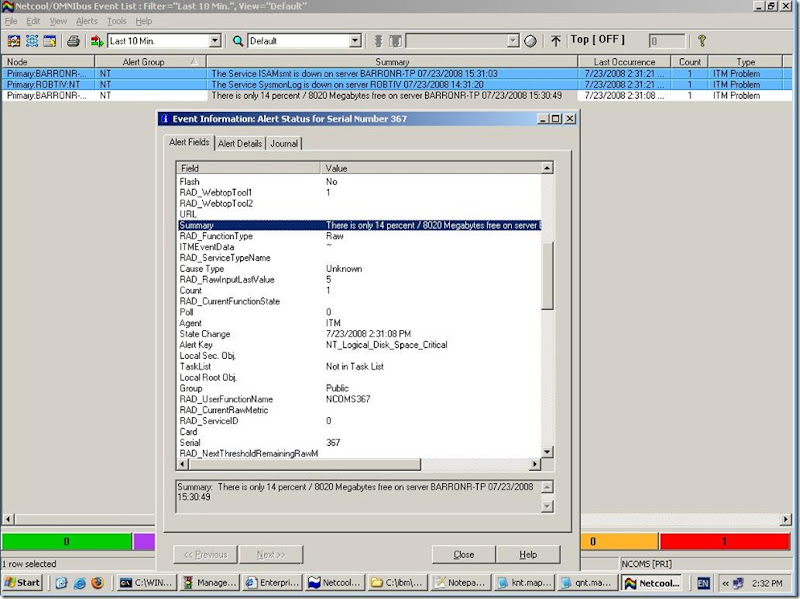
Normal Event Text


instead of the cryptic formula which we had before.

Just goes to show - sometimes things are simpler than I think!

-- Robert

Friday, June 27, 2008

Troubleshooting ITM OS agent on Windows

One of the most common tasks a Tivoli admin has to do is installing an OS agent (TEMA) on a server.
From my experience, it's a reasonably trouble free task, with few gotchas.
First, I'm talking mostly about local installation.
Second, the solutions mostly modify the registry - care must be used when doing so and obviously, I take no responsibility for any problems :)
Here's my list of common problems/solutions :
  1. Install from a local disk, not a network drive - i.e. no \\ in the installation directory.

  2. Simple directory names.
    The most common problems I've had are after installing Java and GSKit, the installation suddenly quits with no warning.
    This is either because:
      1. The TEMP/TMP environment variables point to a "complex" directory - i.e. one with spaces or is longer than 8 characters.
      2. The installation directory is a "complex" directory
      3. The target directory is a "complex" directory
    This is because the installation program is looking for the 8.3 format of the file (not C:\Program Files, but C:\PROGRA~1). When the registry setting HKEY_LOCAL_MACHINE\SYSTEM\CurrentControlSet\Control\Filesystem/NtfsDisable8dot3NameCreation is set to 0, then windows will create both filenames. If it doesn't exist, or is set to 1, then only the complex name is found and the installation fails.
    Another way of checking is running a dir /x command in a DOS box.
    <Caution>
    You must reboot the server for the new setting to be active. I find it's easier to just use simple directory names. The TEMP/TMP environment variables are changed in the Advanced settings of System Properties.
    IBM link : Setup program suddenly terminates after JRE and GSKit installation
  3. Cannot install because a reboot is pending.
    Often when I try to install ITM on a server that hasn't been rebooted in a long time, I'll get that error.
    A reboot will solve the problem, but from then on you'll have a tough time convincing people that ITM doesn't require a reboot!
    The registry key HKEY_LOCAL_MACHINE\SYSTEM\CurrentControlSet\Control\Session Manager\PendingFileRenameOperations (PendingFileRename for Windows 2000) holds the list of filenames which have been marked as changed and are waiting for a reboot. Check them, if they're harmless (I often see adobe files) then just remove them from the registry (export them to a backup file first) and run the installation again. Import the files back to the registry if you like.

    Note: Since ITM6.1 Fixpack 5 Interim Fix 2, the setup ignores most of the files so this should occur less.
    IBM Link: Windows agent reboot pending to rename locked files

  4. GSKit errors in general
    GSKit is something required for ITM and it is installed by the setup program before the ITM agent itself.
    However, sometimes you'll encounter problems with GSKIT and you'll want to uninstall it. There is no built-in uninstallation for a damaged GSKit.
    Here is a step-by-step uninstall routine : http://www-1.ibm.com/support/docview.wss?uid=swg21258721
    There's also a link to ITMRemoveAll in the link - a fast and dirty uninstall for ITM.  

  5. Another option for GSKit problems is this:
    1. Manually copy Windows\InsGSKit\setup.iss to the desired hard-drive in a directory of choice. 
    2. Alter the szDir=C:\Candle\GSK7 statement to use the desired drive letter  (Since Candle management agent was running)
    3. From command line execute:  setup.exe ITM61 --logfile=D:\GSKitTemp\GSKit.log -z -s                
    -SMS -f1"D:\GSKitTemp\setup.iss"

    This will install the GSKit. Once it is completed run the setup.exe of the Agent media. This will install the agent successfully.
These are the most common problems I've had with installing ITM. They're all easily avoidable once you know about them - but are a bit voodoo-like if you don't.
Drop me a line / add a comment if you think there's something I've forgotten.
-- Robert

Thursday, June 5, 2008

A Fistful of Tools...

Here are two more excellent ITM tools

GBSCMD is a command line tool which was developed in house by Gulfsoft which provides functionality which does not exist in ITM. ITM 6.2 and 6.2FP1 have added more options to tacmd, but GBSCMD is a high bar to reach.

ITMSUPER is a new OPAL offering which allows the user to view managed system data, debug situations, and correct environment configurations.
It basically collects and improves on the existing ITM tools in OPAL which I mentioned here.

You may be able to do your work without these tools, but you're certainly handicapping yourself if you don't take the time to download them and give them a spin!

Sunday, June 1, 2008

Listing Situations and their distributions

If you're like me then you've got customers who want to know "Exactly what is being monitored".
They don't want to go to the portal and check for themselves, nor will they use any of the Tools and Scripts which are available.

They just want the list! And they want it now!
What to do, what to do?
ITM has a very nifty feature in which you can extract data from the system using SOAP web services.

I found the exact commands I needed in the Gulfbreeze Blog and in the OrbData site (All the heavy lifting was done by them).

However, the type of person who needs to display this information is probably rather new to ITM and, lets face it, you've got more important things to do right now than learn a few new out-of-the-way features of ITM.

Gulfbreeze and Orbdata assume you know what you're doing. They also give you the data unformatted - i.e. nothing than can be shown to anyone without a lot of massaging of the information.

I'm going to show the simple, cut & paste way of doing it.
(Appendix A of the ITM Administrator's guide goes into all the gory details.)

  1. In order to run a SOAP request, you need two files
    1. In the bin directory of the TEMS server, create a file called URL.txt which contains the text:
      http://TEMSServerName:1920///cms/soap
    2. In the same directory, create a file called SoapRequest.txt and insert the following text:
      (change userid and password to taste)
    3. <CT_Export>
      <filename>data.xml</filename>
      <request>
      <attach>header-data.xml</attach>
      </request>
      <request>
      <CT_Get>
      <userid>sysadmin</userid><password>mypassword</password>
      <table>O4SRV.LOCALTIME</table>
      <sql>
      SELECT TOBJACCL.OBJNAME,TNODELST.NODE
      FROM O4SRV.TNODELST,O4SRV.TOBJACCL
      WHERE TNODELST.NODELIST=TOBJACCL.NODEL AND TNODELST.NODETYPE="V"
      </sql>
      </CT_Get>
      </request>
      </CT_Export>

  2. In order to see the XML data nicely, you need so insert a reference to an XSL file. Add the file header-data.xml into the cms/html directory with the following content:

    <?xml version="1.0" encoding="ISO-8859-1"?>
    <?xml-stylesheet type="text/xsl" href="kshrpt.xsl"?>
  3. From the bin directory, run the command kshsoap SoapRequest.txt URL.txt (or  CandleSOAPClient on *nix)
  4. You should then find a data.xml file in the cms\html directory. Open it in a web browser and you'll get a nicely formatted table of all the situations and the agents they're associated with.

So what did we do?

We used a CT_Get call to extract the information we wanted. (See the documentation and the other blogs for more details as to what exactly the SELECT does).

We wrapped it in a CT_Export so that we would get an XML file.

We added an attachment to the beginning of the XML file so that we could use the formatting file (which comes with ITM)  to present the information as a proper table and not as an odd looking string.

As I said, the hard part is knowing what SELECT to use, but I hope this little entry will help people.